# Reset template

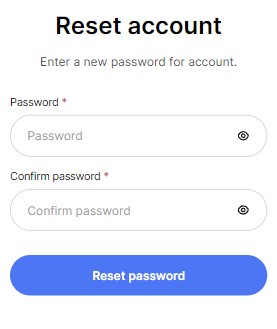
<figure><img src="https://3988388892-files.gitbook.io/~/files/v0/b/gitbook-x-prod.appspot.com/o/spaces%2FX39aWWRJk2Y01xGBqnJw%2Fuploads%2FsmRNemc0JJUlMsqjLOkE%2Freset-desktop.jpg?alt=media&#x26;token=c2481782-3d06-438f-8644-81782f4cef6a" alt=""><figcaption></figcaption></figure>

<figure><img src="https://3988388892-files.gitbook.io/~/files/v0/b/gitbook-x-prod.appspot.com/o/spaces%2FX39aWWRJk2Y01xGBqnJw%2Fuploads%2FSdZbJB7l00z5Hpq6fs8t%2Freset-mobile.jpg?alt=media&#x26;token=2e4cb783-2b0a-47ee-b2fa-303444b6742f" alt=""><figcaption></figcaption></figure>

## **Adding a Section**

The section is static on a **Reset page** template, it was added initially and cannot be removed.

## **Section settings**

### Layout

<figure><img src="https://3988388892-files.gitbook.io/~/files/v0/b/gitbook-x-prod.appspot.com/o/spaces%2FX39aWWRJk2Y01xGBqnJw%2Fuploads%2FjaXsUg6JNyThnRYVDRhB%2Fregister-layout.jpg?alt=media&#x26;token=1602bae7-7eae-4a95-9fc1-eca99392f914" alt=""><figcaption></figcaption></figure>

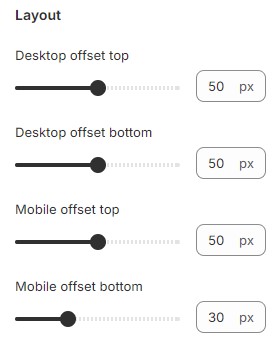
1. **`Desktop offset top`** - the **top** indent of the section on the **desktop**;
2. **`Desktop offset bottom`** - the **bottom** indent of the section on the **desktop**;
3. **`Mobile offset top`** - the **top** indent of the section on the **mobile**;
4. **`Mobile offset bottom`** - the **bottom** indent of the section on the **mobile**.

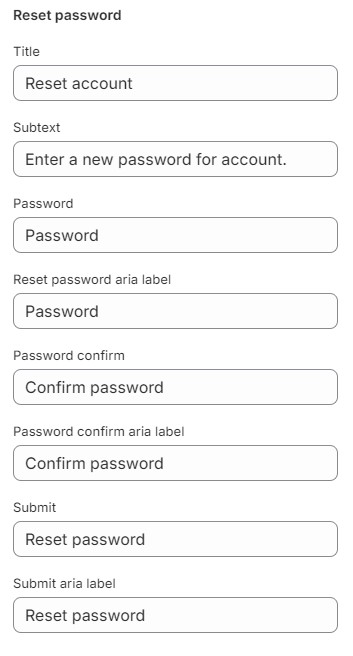
You can customize the text content in the Reset password section of Accounts (classic).

<figure><img src="https://3988388892-files.gitbook.io/~/files/v0/b/gitbook-x-prod.appspot.com/o/spaces%2FX39aWWRJk2Y01xGBqnJw%2Fuploads%2FaanGwUs8WmxsgxTdDo9n%2Freset-theme-content-1.jpg?alt=media&#x26;token=5216809a-98ff-449b-90b3-210eba293256" alt=""><figcaption></figcaption></figure>

1. **`Title`** - setting allows you to select a Title for the section;
2. **`Subtext`** - setting allows you to select a subtext for the section;
3. **`Password`** - setting allows you to select a label for the Password input;
4. **`Password aria label`** - setting allows you to select a aria label for the Password input;
5. **`Password confirm`** - setting allows you to select a label for the Password confirm input;
6. **`Password confirm aria label`** - setting allows you to select a aria label for the Password confirm input;
7. **`Submit`** - setting allows you to select a label for the Submit button;
8. **`Submit aria label`** - setting allows you to select a aria label for the Submit button.

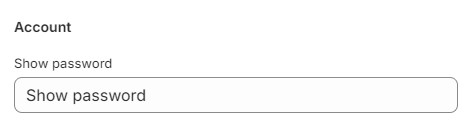
You can customize the text content in the Account section of Accounts (classic).

<figure><img src="https://3988388892-files.gitbook.io/~/files/v0/b/gitbook-x-prod.appspot.com/o/spaces%2FX39aWWRJk2Y01xGBqnJw%2Fuploads%2FuLF7xwdzvo1CJRCsCAoV%2Fregister-theme-content-4.jpg?alt=media&#x26;token=1dc140b8-2ced-4bf6-8794-fd26f2de6ea3" alt=""><figcaption></figcaption></figure>

1. **`Show password`** - setting allows you to select a aria label for the show password button.

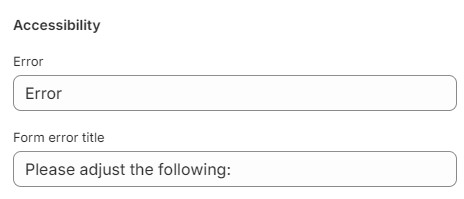
You can customize the text content in the Accessibility section of General

<figure><img src="https://3988388892-files.gitbook.io/~/files/v0/b/gitbook-x-prod.appspot.com/o/spaces%2FX39aWWRJk2Y01xGBqnJw%2Fuploads%2FcoKwPisFyPNoaebUFtQB%2Fregister-theme-content-3.jpg?alt=media&#x26;token=79804220-e560-4177-83b4-4822dcf81b93" alt=""><figcaption></figcaption></figure>

1. **`Error`** - setting allows you to select a title for the error;
2. **`From error title`** - setting allows you to select the from error title;