# Header



<figure><img src="https://3988388892-files.gitbook.io/~/files/v0/b/gitbook-x-prod.appspot.com/o/spaces%2FX39aWWRJk2Y01xGBqnJw%2Fuploads%2FQRfxQRilu5n8HTdJveyR%2FType%3DType%209.png?alt=media&#x26;token=066ec483-5e23-4ba8-b05b-e84297e50534" alt=""><figcaption></figcaption></figure>

<figure><img src="https://3988388892-files.gitbook.io/~/files/v0/b/gitbook-x-prod.appspot.com/o/spaces%2FX39aWWRJk2Y01xGBqnJw%2Fuploads%2FjeB4ABx8O904oPhJuPhx%2FType%3DType8.png?alt=media&#x26;token=b413a000-d7ab-4b8c-96e0-631f33b4f7be" alt=""><figcaption></figcaption></figure>

<figure><img src="https://3988388892-files.gitbook.io/~/files/v0/b/gitbook-x-prod.appspot.com/o/spaces%2FX39aWWRJk2Y01xGBqnJw%2Fuploads%2FoUJelmPHocB42TUCcF9B%2FType%3DLogo%20Center%20-%20Links%20below.png?alt=media&#x26;token=e325ad6c-e865-470d-9f8c-adec6a867a00" alt=""><figcaption></figcaption></figure>

<figure><img src="https://3988388892-files.gitbook.io/~/files/v0/b/gitbook-x-prod.appspot.com/o/spaces%2FX39aWWRJk2Y01xGBqnJw%2Fuploads%2FFvMqsQx7ayWyUAkfxLna%2FType%3DLogo%20Center%20-%20Links%20below%20(Black).png?alt=media&#x26;token=347efe19-3fb9-461b-829e-8879988dd1bb" alt=""><figcaption></figcaption></figure>

<figure><img src="https://3988388892-files.gitbook.io/~/files/v0/b/gitbook-x-prod.appspot.com/o/spaces%2FX39aWWRJk2Y01xGBqnJw%2Fuploads%2Fb7PzzBUtUWz01UKmSWTs%2Fheader-new-icons.png?alt=media&#x26;token=6b46732c-064e-401e-9b5a-8a5c55799f64" alt=""><figcaption></figcaption></figure>

## **Adding a Section**

<figure><img src="https://3988388892-files.gitbook.io/~/files/v0/b/gitbook-x-prod.appspot.com/o/spaces%2FX39aWWRJk2Y01xGBqnJw%2Fuploads%2FbubJ0FCfGXHIN5r9xLjm%2Fheader-section.png?alt=media&#x26;token=86deb441-99d7-4e00-9962-f27e9606dc0e" alt=""><figcaption></figcaption></figure>

The section is static, it is added initially and cannot be removed.

## **Section settings**

### General

<figure><img src="https://3988388892-files.gitbook.io/~/files/v0/b/gitbook-x-prod.appspot.com/o/spaces%2FX39aWWRJk2Y01xGBqnJw%2Fuploads%2Fx0JyRGLQ4Tpo1OLQDNnv%2Fimage.png?alt=media&#x26;token=943678b3-e373-4087-b73f-f8021b8ec731" alt=""><figcaption></figcaption></figure>

* **`Type`** - the setting allows you to set the header type, 3 options are presented:
* `Static`

<figure><img src="https://3988388892-files.gitbook.io/~/files/v0/b/gitbook-x-prod.appspot.com/o/spaces%2FX39aWWRJk2Y01xGBqnJw%2Fuploads%2FcyqRXmIjuqM3UcXVBH0A%2Fheader-static-ezgif.com-gif-to-webp-converter.webp?alt=media&#x26;token=f54b2c11-bedf-46bc-9ebc-fc6da6fed325" alt=""><figcaption></figcaption></figure>

* `Sticky`

<figure><img src="https://3988388892-files.gitbook.io/~/files/v0/b/gitbook-x-prod.appspot.com/o/spaces%2FX39aWWRJk2Y01xGBqnJw%2Fuploads%2FOW7NnbkknS32HXTSIZaw%2Fheader-sticky-ezgif.com-gif-to-webp-converter.webp?alt=media&#x26;token=e47605df-7160-4f20-80e5-4a9f00ff6dd5" alt=""><figcaption></figcaption></figure>

* `Sticky (hide on scroll down)`

<figure><img src="https://3988388892-files.gitbook.io/~/files/v0/b/gitbook-x-prod.appspot.com/o/spaces%2FX39aWWRJk2Y01xGBqnJw%2Fuploads%2FuX5rK89OfWiVs6x3RAEu%2Fheader-sticky-hide-on-scroll-ezgif.com-gif-to-webp-converter.webp?alt=media&#x26;token=84160bff-8d0e-4757-9e4f-20a1adf2ced8" alt=""><figcaption></figcaption></figure>

* **`Enable transparent header on homepage`** - the setting allows you to enable a transparent header. Transparent header only functions on Desktop resolution. When the setting is enabled, the header will be transparent only in the top position, when hovering and scrolling the page, the header will have a background;

<figure><img src="https://3988388892-files.gitbook.io/~/files/v0/b/gitbook-x-prod.appspot.com/o/spaces%2FX39aWWRJk2Y01xGBqnJw%2Fuploads%2FhR2o1c0K1qZxVDoe93RU%2Fheader-transparent%20(1).png?alt=media&#x26;token=8ced5c54-ef34-4d86-8e8d-a4be6845ed88" alt=""><figcaption></figcaption></figure>

* **`Enable rounded header` -** the setting allows you to enable a rounded header;

<figure><img src="https://3988388892-files.gitbook.io/~/files/v0/b/gitbook-x-prod.appspot.com/o/spaces%2FX39aWWRJk2Y01xGBqnJw%2Fuploads%2FVVp5WnsfP6AQpVqOoSVL%2Fheader-new-icons-rounded.png?alt=media&#x26;token=31cfd880-1dee-4e88-a880-e517e5850559" alt=""><figcaption></figcaption></figure>

* **`Show box shadow`** - the setting allows you to set a box-shadow;
* **`Show language selector`** - the checkbox is responsible for enabling/disabling change a language selector.
* **`Show country/region selector`** - the checkbox is responsible for enabling/disabling change a country/region.
* **`Show full country name`** - the checkbox is responsible to show full/short country name in the “Country” selector.

### Logo

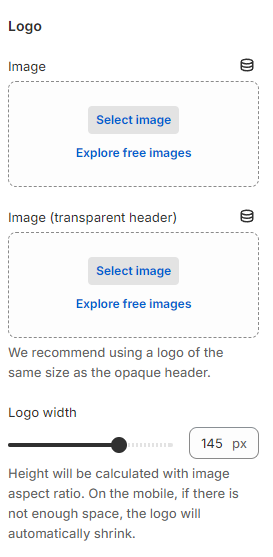
<figure><img src="https://3988388892-files.gitbook.io/~/files/v0/b/gitbook-x-prod.appspot.com/o/spaces%2FX39aWWRJk2Y01xGBqnJw%2Fuploads%2FsU4ZSlYbtug0UhX3LKV3%2Fheader-settings-logo.png?alt=media&#x26;token=a4f20870-8b6c-45c0-8b0a-9a2d64c4515d" alt=""><figcaption></figcaption></figure>

1. **`Image`** - the setting allows you to set the logo image, if not specified, the text name of the store will be displayed;
2. **`Image (transparent header)`** - the setting allows you to set the logo image for a transparent header, if not specified, the `image` will be displayed. We recommend using a logo of the same size as the opaque header;
3. **`Logo width`** - **range** with which you can specify the width of the logo from **20px** to **200px** on the **Desktop**. On the mobile, if there is not enough space, the logo will automatically shrink;

### Menu

<figure><img src="https://3988388892-files.gitbook.io/~/files/v0/b/gitbook-x-prod.appspot.com/o/spaces%2FX39aWWRJk2Y01xGBqnJw%2Fuploads%2Fg9tabVowg7PTcxp7WHbU%2Fheader-settings-menu.png?alt=media&#x26;token=6dfd4ec6-7f80-4f8c-9ea0-bdbc3b363802" alt=""><figcaption></figcaption></figure>

* **`Main menu`** - the setting allows you to set a menu that will be used for both **Desktop** and **Mobile**;
* **`Desktop position`** - the setting is responsible for the position of the menu on the **Desktop**

  * `Left`

  <figure><img src="https://3988388892-files.gitbook.io/~/files/v0/b/gitbook-x-prod.appspot.com/o/spaces%2FX39aWWRJk2Y01xGBqnJw%2Fuploads%2FXctDP1yD1Ltojcq47e4t%2Fleft.png?alt=media&#x26;token=54af19a1-1674-47eb-bd1a-70127e0871fa" alt=""><figcaption></figcaption></figure>

  * `Middle`

  <figure><img src="https://3988388892-files.gitbook.io/~/files/v0/b/gitbook-x-prod.appspot.com/o/spaces%2FX39aWWRJk2Y01xGBqnJw%2Fuploads%2FEBLxHbKS6n1jo35TvAgl%2Fmiddle.png?alt=media&#x26;token=2062b8d7-9f02-496c-952b-901fecf0c68e" alt=""><figcaption></figcaption></figure>

  * `Bottom`

  <figure><img src="https://3988388892-files.gitbook.io/~/files/v0/b/gitbook-x-prod.appspot.com/o/spaces%2FX39aWWRJk2Y01xGBqnJw%2Fuploads%2FHqkfe9JENEAEVqd5l8pH%2Fbottom.png?alt=media&#x26;token=4c0d3832-70bc-414c-90e8-5e83d26bff1a" alt=""><figcaption></figcaption></figure>
* **`Type`** - the setting allows you to set nested menu type selector for **Desktop**:

  * `both`

  <figure><img src="https://3988388892-files.gitbook.io/~/files/v0/b/gitbook-x-prod.appspot.com/o/spaces%2FX39aWWRJk2Y01xGBqnJw%2Fuploads%2F0WtUucQtxnudJgqG2nEM%2Fheader-type-both.webp?alt=media&#x26;token=10debe7f-ccae-4d0f-9bd8-3e1287624511" alt=""><figcaption></figcaption></figure>

  * `dropdown`

  <figure><img src="https://3988388892-files.gitbook.io/~/files/v0/b/gitbook-x-prod.appspot.com/o/spaces%2FX39aWWRJk2Y01xGBqnJw%2Fuploads%2Fbwo4jpAxLONGk2jdLqhZ%2Fheader-type-dropdown.webp?alt=media&#x26;token=07b6a74e-f149-48a1-923e-e6c9b1be9b83" alt=""><figcaption></figcaption></figure>

  * `megamenu`

  <figure><img src="https://3988388892-files.gitbook.io/~/files/v0/b/gitbook-x-prod.appspot.com/o/spaces%2FX39aWWRJk2Y01xGBqnJw%2Fuploads%2FMM52KzBr509dSs3AEcxZ%2Fheader-type-mega-menu.webp?alt=media&#x26;token=e99e9799-4146-414b-96d0-e7048c69f1f6" alt=""><figcaption></figcaption></figure>
* **`Open by`** - the setting allows you to set submenu opening selection selector on **Desktop**: *By hover, By click;*
* **`Highlighted link name`** - in this field you should specify the name of the menu first level link to which the highlighting should be applied.

<figure><img src="https://3988388892-files.gitbook.io/~/files/v0/b/gitbook-x-prod.appspot.com/o/spaces%2FX39aWWRJk2Y01xGBqnJw%2Fuploads%2FqUkBh89OlXY3BBPaqEBH%2Fheader-hightlighted.png?alt=media&#x26;token=99d721fe-f5d9-49e9-97c7-9813d7f80163" alt=""><figcaption></figcaption></figure>

### **Burger menu**

<figure><img src="https://3988388892-files.gitbook.io/~/files/v0/b/gitbook-x-prod.appspot.com/o/spaces%2FX39aWWRJk2Y01xGBqnJw%2Fuploads%2FyGHDuTIfyYpVUhuheQMe%2Fheader-burger-menu.webp?alt=media&#x26;token=57af77c9-2d8a-4f66-aae4-3bcb1988ff47" alt=""><figcaption></figcaption></figure>

<figure><img src="https://3988388892-files.gitbook.io/~/files/v0/b/gitbook-x-prod.appspot.com/o/spaces%2FX39aWWRJk2Y01xGBqnJw%2Fuploads%2Fg0nEB6zRgxbUuBCFOfIv%2Fheader-mobile-burger-menu.png?alt=media&#x26;token=c319f00b-5ea4-4a63-8b2f-3e4f81349c40" alt=""><figcaption></figcaption></figure>

<figure><img src="https://3988388892-files.gitbook.io/~/files/v0/b/gitbook-x-prod.appspot.com/o/spaces%2FX39aWWRJk2Y01xGBqnJw%2Fuploads%2FV9InWQnYUBrk0RP0hD76%2Fheader-settings-burger-menu.png?alt=media&#x26;token=fea3256f-1910-4118-9fea-99a1210b317d" alt=""><figcaption></figcaption></figure>

* **`Enable`** - setting allows you to enable the burger menu. The burger menu will be displayed if “Primary menu” or “Secondary menu” is set;
* **`Primary menu`** - the setting allows you to set a primary menu for the burger menu;
* **`Secondary menu`** - the setting allows you to set a secondary menu for the burger menu;
* **`Image`** - the setting allows you to specify an image;
* **`Heading`** - the setting allows you to specify a heading for the image;
* **`Subheading`** - the setting allows you to specify a subheading for the image;
* **`Link`** - the setting allows you to specify a link for the image.

### **Colors (Background)**

<figure><img src="https://3988388892-files.gitbook.io/~/files/v0/b/gitbook-x-prod.appspot.com/o/spaces%2FX39aWWRJk2Y01xGBqnJw%2Fuploads%2FB6jhUvlWRV3PD8PesZFP%2Fheader-colors-background.png?alt=media&#x26;token=9804eee0-cd05-41ca-b855-6397e2226ec4" alt=""><figcaption></figcaption></figure>

* **`Background`** - the setting allows you to set the header background and dropdown menus;
* **`Background mobile menu`** - the setting allows you to set the background for the mobile menu;
* **`Bottom menu background`** - the setting allows you to set the header bottom menu background (menu desktop position - bottom).

### **Colors (Border)**

<figure><img src="https://3988388892-files.gitbook.io/~/files/v0/b/gitbook-x-prod.appspot.com/o/spaces%2FX39aWWRJk2Y01xGBqnJw%2Fuploads%2FzAFqcByRPfnqJ3KkDZh6%2Fheader-colors-border.png?alt=media&#x26;token=f0b349b3-31ee-4726-9be0-da6ea9989aec" alt=""><figcaption></figcaption></figure>

* **`Menu border color`** - the setting allows you to set the header menu borderd color (used in burger menu, mobile menu if burger menu enabled);
* **`Bottom menu border color`** - the setting allows you to set the header bottom menu borderd color (menu desktop position - bottom);
* **`Botton menu border color (transparent)`** - the setting allows you to set the header bottom menu borderd color in the transparent header (menu desktop position - bottom).

### **Colors (Text)**

<figure><img src="https://3988388892-files.gitbook.io/~/files/v0/b/gitbook-x-prod.appspot.com/o/spaces%2FX39aWWRJk2Y01xGBqnJw%2Fuploads%2FoMQtnMxqWR539sgzcQjk%2Fheader-colors-text.png?alt=media&#x26;token=caf1f2d1-7e71-4b09-82e7-5a61889f157c" alt=""><figcaption></figcaption></figure>

* **`Text`** - the setting allows you to set a text color;
* **`Text (active / hover)`** - the setting allows you to set a text color for active text elements or on hover state;
* **`Text background (selected)`** - the setting allows you to specify a background color for a selected menu item on megamenu;
* **`Text secondary`** - the setting allows you to set a secondary text color. Used in bottom menu (menu desktop position - bottom);
* **`Text secondary (active / hover)`** - the setting allows you to set a secondary text color for active text elements or on hover state. Used in bottom menu (menu desktop position - bottom);
* **`Text (header transparent)`** - the setting allows you to set a text color in the transparent header;
* **`Text (header transparent)(active)`** - the setting allows you to set a text color for active text elements in the transparent header;

### **Colors (Highlighted link)**

<figure><img src="https://3988388892-files.gitbook.io/~/files/v0/b/gitbook-x-prod.appspot.com/o/spaces%2FX39aWWRJk2Y01xGBqnJw%2Fuploads%2Fb0A9gv3aT87Cjv2gN79i%2Fheader-colors-highlighted.png?alt=media&#x26;token=7d542f66-3e25-4f55-9fee-32302d5cb119" alt=""><figcaption></figcaption></figure>

* **`Highlighted link color`** - the setting allows you to specify a text color for the menu first level link specified in the “Highlighted link name” setting.

### **Colors (Icon)**

<figure><img src="https://3988388892-files.gitbook.io/~/files/v0/b/gitbook-x-prod.appspot.com/o/spaces%2FX39aWWRJk2Y01xGBqnJw%2Fuploads%2F5KZaiRyowGFI9Ym0NmbT%2Fheader-colors-icon.png?alt=media&#x26;token=9c4d6b2c-0eaa-4725-a962-5a324c7fdebc" alt=""><figcaption></figcaption></figure>

* **`Icon`** - the setting allows you to set a color for the icons;
* **`Icon (transparent)`** - the setting allows you to set a color for the icons in the transparent header.

### **Colors (Count)**

<figure><img src="https://3988388892-files.gitbook.io/~/files/v0/b/gitbook-x-prod.appspot.com/o/spaces%2FX39aWWRJk2Y01xGBqnJw%2Fuploads%2FbI6QdZtLoOlsMu8v51lv%2Fheader-colors-count.png?alt=media&#x26;token=77228647-3289-42a8-8328-307be58bf65c" alt=""><figcaption></figcaption></figure>

* **`Count text`** - the setting allows you to set a color for the text of the number of items in the cart;
* **`Count text (transparent)`** - the setting allows you to set a color for the text of the number of items in the cart in the transparent header;
* **`Count background`** - the setting allows you to set a color for the background of the number of items in the cart;
* **`Count background (transparent)`** - the setting allows you to set a color for the background of the number of items in the cart in the transparent header.

### **Colors (Mega menu image)**

<figure><img src="https://3988388892-files.gitbook.io/~/files/v0/b/gitbook-x-prod.appspot.com/o/spaces%2FX39aWWRJk2Y01xGBqnJw%2Fuploads%2FDSRKdgo720jeyeGleeN3%2Fheader-colors-mega-menu-image.png?alt=media&#x26;token=982926ed-1e9f-461c-b903-442653ef4a0b" alt=""><figcaption></figcaption></figure>

* **`Mega menu image text`** - the setting allows you to set a color for the image text in the mega menu;
* **`Mega menu image overlay`** - the setting allows you to set an overlay color for the first image in the mega menu.

### **Colors (Burger button)**

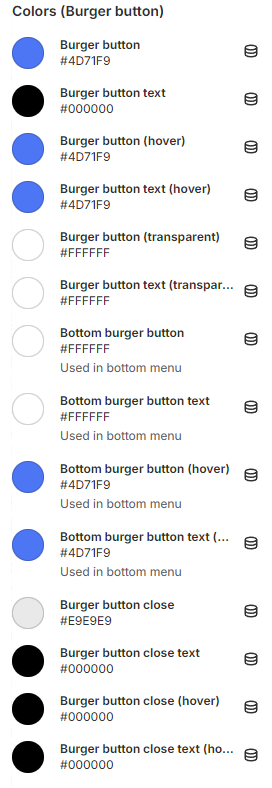
<figure><img src="https://3988388892-files.gitbook.io/~/files/v0/b/gitbook-x-prod.appspot.com/o/spaces%2FX39aWWRJk2Y01xGBqnJw%2Fuploads%2FlMz6jopQQTgfHCMFXAkc%2Fheader-colors-burger-button.png?alt=media&#x26;token=ceb0d843-9f4c-4e70-9ea1-c28e62e76941" alt=""><figcaption></figcaption></figure>

* **`Burger button`** - the setting allows you to set a burger button color;
* **`Burger button text`** - the setting allows you to set a burger button text color;
* **`Burger button (hover)`** - the setting allows you to set a burger button color on hover state;
* **`Burger button text (hover)`** - the setting allows you to set a burger button text color on hover state;
* **`Burger button (transparent)`** - the setting allows you to set a burger button color in the transparent header;
* **`Burger button text (transparent)`** - the setting allows you to set a burger button text color in the transparent header;
* **`Bottom burger button`** - the setting allows you to set a bottom burger button color. Used in bottom menu (menu desktop position - bottom);
* **`Bottom burger button text`** - the setting allows you to set a bottom burger button text color. Used in bottom menu (menu desktop position - bottom);
* **`Bottom burger button (hover)`** - the setting allows you to set a bottom burger button color on hover state. Used in bottom menu (menu desktop position - bottom);
* **`Bottom burger button text (hover)`** - the setting allows you to set a botton burger button text color on hover state. Used in bottom menu (menu desktop position - bottom);
* **`Burger button close`** - the setting allows you to set a burger button close color;
* **`Burger button close text`** - the setting allows you to set a burger button close text color;
* **`Burger button close (hover)`** - the setting allows you to set a burger button close color on hover state;
* **`Burger button close text (hover)`** - the setting allows you to set a burger button close text color on hover state;

### **Colors (Search input)**

<figure><img src="https://3988388892-files.gitbook.io/~/files/v0/b/gitbook-x-prod.appspot.com/o/spaces%2FX39aWWRJk2Y01xGBqnJw%2Fuploads%2FPRmx6VjkWM5499ZngfP3%2Fheader-colors-search-input.png?alt=media&#x26;token=d4edcdc4-c8e0-47c4-9270-565826e54ba9" alt=""><figcaption></figcaption></figure>

* **`Search input`** - the setting allows you to set a color for search input;
* **`Search input text`**- the setting allows you to set a text color for search input;
* **`Search input (transparent)`** - the setting allows you to set a color for search input in the transparent header;
* **`Search input text (transparent)`** - the setting allows you to set a text color for search input in the transparent header.

## **Blocks settings**

## **Block Mega menu**

<figure><img src="https://3988388892-files.gitbook.io/~/files/v0/b/gitbook-x-prod.appspot.com/o/spaces%2FX39aWWRJk2Y01xGBqnJw%2Fuploads%2F4gmo6PHlGJaVOOY3Ftfp%2Fmega-menu.png?alt=media&#x26;token=d6c72e00-ae7c-4bd5-8807-2dad1fd147b4" alt=""><figcaption></figcaption></figure>

<figure><img src="https://3988388892-files.gitbook.io/~/files/v0/b/gitbook-x-prod.appspot.com/o/spaces%2FX39aWWRJk2Y01xGBqnJw%2Fuploads%2FfR3aXcJnXZujVKeaViIM%2Fheader-mega-menu-mobile.png?alt=media&#x26;token=fbab5a9b-c565-4252-b9f2-a3bd6080ea1e" alt=""><figcaption></figcaption></figure>

### General

<figure><img src="https://3988388892-files.gitbook.io/~/files/v0/b/gitbook-x-prod.appspot.com/o/spaces%2FX39aWWRJk2Y01xGBqnJw%2Fuploads%2FXrNirtMviriYX9oejs6J%2Fheader-mega-menu-settings.png?alt=media&#x26;token=9ca895b7-e544-4e01-ac82-0a2b2068c471" alt=""><figcaption></figcaption></figure>

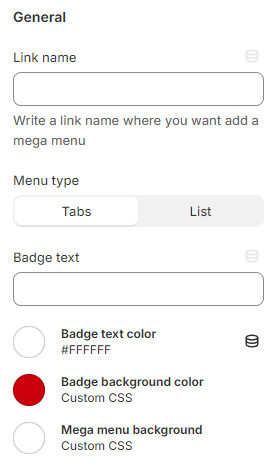
* **`Link name`** - in this field, you must specify the **name** of the first-level link to which the mega menu should be added. Mega Menu will be displayed if the main menu contains a nested level;
* **`Menu type`** - setting allows you to select the type of menu display. There are 2 types:

  * **`Tabs`** - in this item, the second menu level is displayed, by clicking on the items of which you can select the 3rd menu level;

  <figure><img src="https://3988388892-files.gitbook.io/~/files/v0/b/gitbook-x-prod.appspot.com/o/spaces%2FX39aWWRJk2Y01xGBqnJw%2Fuploads%2FUou7QYIJwxi0r6gzYWNi%2Fmega-menu-tabs.png?alt=media&#x26;token=f6675bef-37e0-4e6e-b2a7-d03884408f3b" alt=""><figcaption></figcaption></figure>

  * **`List`** - in this item, a menu is naturally displayed, where the second level is the title and the 3rd level is like a list under it. If the second level menu link is set to "#", then the plain text will be displayed;

  <figure><img src="https://3988388892-files.gitbook.io/~/files/v0/b/gitbook-x-prod.appspot.com/o/spaces%2FX39aWWRJk2Y01xGBqnJw%2Fuploads%2FKeqJz7WARSbU1b1Zhsr2%2Fmega-menu-list.png?alt=media&#x26;token=bc20bda4-d0b3-46f5-b4d5-3debd4bbb062" alt=""><figcaption></figcaption></figure>
* **`Badge text`** - this setting allows you to add a badge above the menu;

<figure><img src="https://3988388892-files.gitbook.io/~/files/v0/b/gitbook-x-prod.appspot.com/o/spaces%2FX39aWWRJk2Y01xGBqnJw%2Fuploads%2FQO1p7GIEyaES3vadRToB%2Fheader-mega-menu-4.png?alt=media&#x26;token=cdf77b86-f238-4ec3-8eb7-84be30542853" alt=""><figcaption></figcaption></figure>

* **`Badge text color`** - this setting allows you to set the text color of the badge;
* **`Badge background color`** - this setting allows you to set the color background color of the badge;
* **`Mega menu background`** - this setting allows you to set the color background color of the mega menu.

### Media item 1 / Media item 2

<figure><img src="https://3988388892-files.gitbook.io/~/files/v0/b/gitbook-x-prod.appspot.com/o/spaces%2FX39aWWRJk2Y01xGBqnJw%2Fuploads%2FGL6dcTmrWfnRZAcrUPLO%2Fheader-mega-menu-settings-2.png?alt=media&#x26;token=c3d5cc75-9c74-4da7-b7d4-81f99453a806" alt=""><figcaption></figcaption></figure>

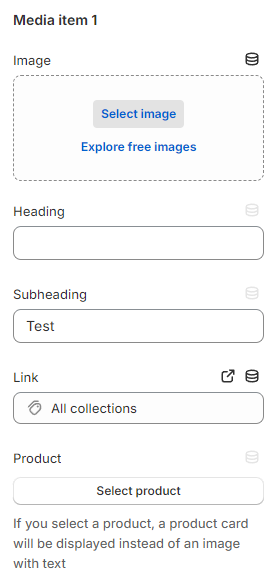
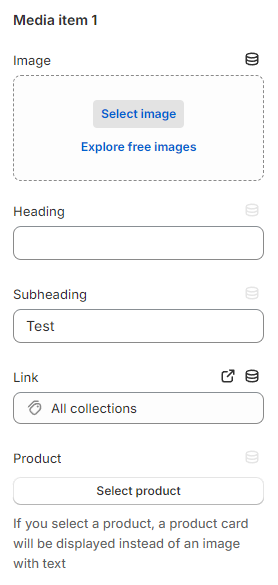
* **`Image`** - this setting allows you to set the first image in the **mega menu**;
* **`Heading`** - this setting allows you to set a **heading** to the first image in the **mega menu**;
* **`Subheading`** - this setting allows you to set a **subheading** to the first image in the **mega menu**;&#x20;
* **`Link`** - this setting allows you to set a **link** to the first image in the **mega menu**;
* **`Product`** - this setting allows you to display a product card. The product has a higher priority than the picture.

<figure><img src="https://3988388892-files.gitbook.io/~/files/v0/b/gitbook-x-prod.appspot.com/o/spaces%2FX39aWWRJk2Y01xGBqnJw%2Fuploads%2FkpGlw4GD3zhnc7GYI8dh%2Fmega-menu-media.png?alt=media&#x26;token=741e65a5-fdb0-469d-8afc-7ac7a07b4f6d" alt=""><figcaption></figcaption></figure>

## **Block Mega Menu Split Menu**

<figure><img src="https://3988388892-files.gitbook.io/~/files/v0/b/gitbook-x-prod.appspot.com/o/spaces%2FX39aWWRJk2Y01xGBqnJw%2Fuploads%2FPwUXYsr1CKzVA09U1yQc%2Fmega-menu-half-to-half%20(1).png?alt=media&#x26;token=69d6acc4-8719-4e69-990c-a120dbe534e9" alt=""><figcaption></figcaption></figure>

<figure><img src="https://3988388892-files.gitbook.io/~/files/v0/b/gitbook-x-prod.appspot.com/o/spaces%2FX39aWWRJk2Y01xGBqnJw%2Fuploads%2FSNbIk45xkAKv67ig8km5%2Fheader-mega-half-mobile.png?alt=media&#x26;token=f4fb684b-9d2f-49b1-8618-511bfdf728b0" alt=""><figcaption></figcaption></figure>

### General

<figure><img src="https://3988388892-files.gitbook.io/~/files/v0/b/gitbook-x-prod.appspot.com/o/spaces%2FX39aWWRJk2Y01xGBqnJw%2Fuploads%2FNB1iYvQKjhzBdWjAnRO1%2Fheader-mega-half-settings.png?alt=media&#x26;token=5ec58aa0-9d51-4fab-85f1-1e65c24b236c" alt=""><figcaption></figcaption></figure>

* **`Link name`** - in this field, you must specify the **name** of the first-level link to which the mega menu should be added;
* **`Badge text`** - this setting allows you to add a badge above the menu;
* **`Badge text color`** - this setting allows you to set the text color of the badge;

<figure><img src="https://3988388892-files.gitbook.io/~/files/v0/b/gitbook-x-prod.appspot.com/o/spaces%2FX39aWWRJk2Y01xGBqnJw%2Fuploads%2FQO1p7GIEyaES3vadRToB%2Fheader-mega-menu-4.png?alt=media&#x26;token=cdf77b86-f238-4ec3-8eb7-84be30542853" alt=""><figcaption></figcaption></figure>

* **`Badge background color`** - this setting allows you to set the background color of the badge;
* **`Mega menu background`** - this setting allows you to set the color background color of the mega menu.

### Text side

<figure><img src="https://3988388892-files.gitbook.io/~/files/v0/b/gitbook-x-prod.appspot.com/o/spaces%2FX39aWWRJk2Y01xGBqnJw%2Fuploads%2FV3WWw2RpM2bPJLXqm7n9%2Fheader-mega-half-settings-1.png?alt=media&#x26;token=38d729cd-62cd-41c2-96a4-7931a1133e93" alt=""><figcaption></figcaption></figure>

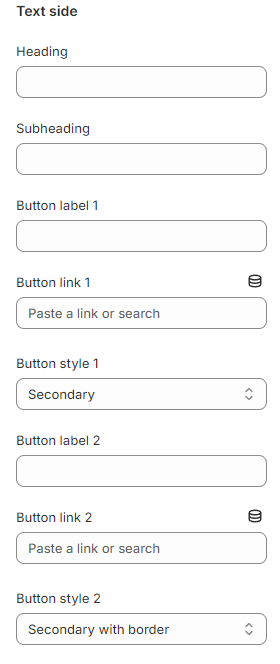
* **`Heading`** - the setting allows you to specify a heading;
* **`Subheading`** - the setting allows you to specify a subheading;
* **`Button label 1`** - the setting allows you to specify a label for button 1;
* **`Button link 1`** - the setting allows you to specify a link for button 1;
* **`Button style 1`** - the setting allows you to select a style for button 1;
* **`Button label 2`** - the setting allows you to specify a label for button 2;
* **`Button link 2`** - the setting allows you to specify a link for button 2;
* **`Button style 2`** - the setting allows you to select a style for button 2.

### Image side

<figure><img src="https://3988388892-files.gitbook.io/~/files/v0/b/gitbook-x-prod.appspot.com/o/spaces%2FX39aWWRJk2Y01xGBqnJw%2Fuploads%2FeT8VYibEokQYN37IRj2p%2Fheader-mega-half-settings-2.png?alt=media&#x26;token=40980b97-412d-46fb-b13f-7dc534a6bae4" alt=""><figcaption></figcaption></figure>

1. **`Image`** - the setting allows you to specify the image;
2. **`Image link`** - the setting allows you to specify the link on the image.

## **Block Mega Menu Tier Menus**

<figure><img src="https://3988388892-files.gitbook.io/~/files/v0/b/gitbook-x-prod.appspot.com/o/spaces%2FX39aWWRJk2Y01xGBqnJw%2Fuploads%2FsUS0CG90CgwS4F8Or0X4%2Fmega-menu-row-menus.png?alt=media&#x26;token=64d41976-ae23-44b2-8ad7-fe5ccf55552d" alt=""><figcaption></figcaption></figure>

<figure><img src="https://3988388892-files.gitbook.io/~/files/v0/b/gitbook-x-prod.appspot.com/o/spaces%2FX39aWWRJk2Y01xGBqnJw%2Fuploads%2Fjls8gtDjwDpAHQwKmoG0%2Fheader-mega-rows-mobile.png?alt=media&#x26;token=e989de13-74e3-46dd-ac4b-931c66beaaf7" alt=""><figcaption></figcaption></figure>

### General

<figure><img src="https://3988388892-files.gitbook.io/~/files/v0/b/gitbook-x-prod.appspot.com/o/spaces%2FX39aWWRJk2Y01xGBqnJw%2Fuploads%2FXIVyJJFNPnzH1mZK7zDl%2Fheader-mega-half-settings.png?alt=media&#x26;token=f654870c-c27b-471c-ad5a-14ffb61a1c3d" alt=""><figcaption></figcaption></figure>

1. **`Link name`** - in this field, you must specify the **name** of the first-level link to which the mega menu should be added. Mega Menu will be displayed if the main menu contains a nested level;
2. **`Badge text`** - this setting allows you to add a badge above the menu;

<figure><img src="https://3988388892-files.gitbook.io/~/files/v0/b/gitbook-x-prod.appspot.com/o/spaces%2FX39aWWRJk2Y01xGBqnJw%2Fuploads%2FQO1p7GIEyaES3vadRToB%2Fheader-mega-menu-4.png?alt=media&#x26;token=cdf77b86-f238-4ec3-8eb7-84be30542853" alt=""><figcaption></figcaption></figure>

1. **`Badge text color`** - this setting allows you to set the text color of the badge;
2. **`Badge background color`** - this setting allows you to set the background color of the badge;
3. **`Mega menu background`** - this setting allows you to set the color background color of the mega menu.

### Media item 1 / Media item 2

<figure><img src="https://3988388892-files.gitbook.io/~/files/v0/b/gitbook-x-prod.appspot.com/o/spaces%2FX39aWWRJk2Y01xGBqnJw%2Fuploads%2FGGsEcg7cUybkMlyCrLWk%2Fheader-mega-menu-settings-2.png?alt=media&#x26;token=199f42e5-1482-4a0b-9cae-334beb3758e0" alt=""><figcaption></figcaption></figure>

* **`Image`** - this setting allows you to set the first image in the **mega menu**;
* **`Heading`** - this setting allows you to set a **heading** to the first image in the **mega menu**;
* **`Subheading`** - this setting allows you to set a **subheading** to the first image in the **mega menu**;
* **`Link`** - this setting allows you to set a **link** to the first image in the **mega menu**;
* **`Product`** - this setting allows you to display a product card. The product has a higher priority than the picture.

## **Block Mega Menu Media**

<figure><img src="https://3988388892-files.gitbook.io/~/files/v0/b/gitbook-x-prod.appspot.com/o/spaces%2FX39aWWRJk2Y01xGBqnJw%2Fuploads%2FMMCxMXCqnKCX4Epsme2Z%2Fmega-menu-images1%20(1).png?alt=media&#x26;token=17f397d3-d883-40bf-93da-3b4c0bda5d22" alt=""><figcaption></figcaption></figure>

<figure><img src="https://3988388892-files.gitbook.io/~/files/v0/b/gitbook-x-prod.appspot.com/o/spaces%2FX39aWWRJk2Y01xGBqnJw%2Fuploads%2FS4JOeiBO98rpCLSvugxa%2Fheader-mega-image-rows-mobile.png?alt=media&#x26;token=61d96fb2-79ac-446f-b575-33e79dc3ad5c" alt=""><figcaption></figcaption></figure>

### General

<figure><img src="https://3988388892-files.gitbook.io/~/files/v0/b/gitbook-x-prod.appspot.com/o/spaces%2FX39aWWRJk2Y01xGBqnJw%2Fuploads%2FXIVyJJFNPnzH1mZK7zDl%2Fheader-mega-half-settings.png?alt=media&#x26;token=f654870c-c27b-471c-ad5a-14ffb61a1c3d" alt=""><figcaption></figcaption></figure>

* **`Link name`** - in this field, you must specify the **name** of the first-level link to which the mega menu should be added;
* **`Badge text`** - this setting allows you to add a badge above the menu;
* **`Badge text color`** - this setting allows you to set the text color of the badge;

<figure><img src="https://3988388892-files.gitbook.io/~/files/v0/b/gitbook-x-prod.appspot.com/o/spaces%2FX39aWWRJk2Y01xGBqnJw%2Fuploads%2FQO1p7GIEyaES3vadRToB%2Fheader-mega-menu-4.png?alt=media&#x26;token=cdf77b86-f238-4ec3-8eb7-84be30542853" alt=""><figcaption></figcaption></figure>

* **`Badge background color`** - this setting allows you to set the background color of the badge;
* **`Mega menu background`** - this setting allows you to set the color background color of the mega menu.

### Media item (1-6)

<figure><img src="https://3988388892-files.gitbook.io/~/files/v0/b/gitbook-x-prod.appspot.com/o/spaces%2FX39aWWRJk2Y01xGBqnJw%2Fuploads%2FGGsEcg7cUybkMlyCrLWk%2Fheader-mega-menu-settings-2.png?alt=media&#x26;token=199f42e5-1482-4a0b-9cae-334beb3758e0" alt=""><figcaption></figcaption></figure>

* **`Image`** - the setting allows you to specify an image;
* **`Heading`** - the setting allows you to specify a heading;
* **`Subheading`** - the setting allows you to specify a subheading;
* **`Link`** - the setting allows you to specify a link;
* **`Product`** - the setting allows you to specify a product. The product has a higher priority than the picture.

## **Block Mega menu brands**

<figure><img src="https://3988388892-files.gitbook.io/~/files/v0/b/gitbook-x-prod.appspot.com/o/spaces%2FX39aWWRJk2Y01xGBqnJw%2Fuploads%2FRwMccDIWpAwd62A4rkod%2Fheader-mega-brands.png?alt=media&#x26;token=c14956ec-9d93-4980-93c0-a53fab06fc53" alt=""><figcaption></figcaption></figure>

<figure><img src="https://3988388892-files.gitbook.io/~/files/v0/b/gitbook-x-prod.appspot.com/o/spaces%2FX39aWWRJk2Y01xGBqnJw%2Fuploads%2FA0h59McpaZDCJnvN9KtN%2Fheader-mega-brands-2.png?alt=media&#x26;token=8dca78b4-8f0a-4c6d-bf84-99f81c7c9581" alt=""><figcaption></figcaption></figure>

<figure><img src="https://3988388892-files.gitbook.io/~/files/v0/b/gitbook-x-prod.appspot.com/o/spaces%2FX39aWWRJk2Y01xGBqnJw%2Fuploads%2F1EgFBJQk7LufLYMKGFHN%2Fheader-mega-brands.webp?alt=media&#x26;token=801bf9e6-9322-4df6-b730-88825a880f6c" alt=""><figcaption></figcaption></figure>

<figure><img src="https://3988388892-files.gitbook.io/~/files/v0/b/gitbook-x-prod.appspot.com/o/spaces%2FX39aWWRJk2Y01xGBqnJw%2Fuploads%2FFBQMF9EyFCnBPe5TIDK2%2Fheader-mega-brands-3.png?alt=media&#x26;token=8ef73265-5789-4000-9b43-a052958e22f4" alt=""><figcaption></figcaption></figure>

### General

<figure><img src="https://3988388892-files.gitbook.io/~/files/v0/b/gitbook-x-prod.appspot.com/o/spaces%2FX39aWWRJk2Y01xGBqnJw%2Fuploads%2FO2SQrKoeJn0WRXAe3UXW%2Fheader-mega-brands-settings.png?alt=media&#x26;token=d2e7f29e-5d92-40af-8a53-584b5c026eed" alt=""><figcaption></figcaption></figure>

The menu of brands will be sorted alphabetically. If the Show alphabet setting is enabled the menu will be grouped by the first character of the menu items without repeats. The filter will also display the first characters of the menu items without repeats.

* **`Link name`** - in this field, you must specify the **name** of the first-level link to which the mega menu should be added. Mega Menu will be displayed if the main menu contains a nested level;
* **`Burger menu link name name`** - in this field, you must specify the **name** of the burger menu first-level link to which the burger menu should be added. Mega Menu will be displayed if the main menu contains a nested level;
* **`Show alphabet`** - this setting allows you to enable the filter;

  * `enabled`
  *

  ```
  <figure><img src="https://3988388892-files.gitbook.io/~/files/v0/b/gitbook-x-prod.appspot.com/o/spaces%2FX39aWWRJk2Y01xGBqnJw%2Fuploads%2FVYfbgnHn4H3YOMiswH3J%2Fheader-mega-brands-4.png?alt=media&#x26;token=94e20c05-d48c-49ad-904d-2ea74f57f47e" alt=""><figcaption></figcaption></figure>
  ```

  * `disabled`
  *

  ```
  <figure><img src="https://3988388892-files.gitbook.io/~/files/v0/b/gitbook-x-prod.appspot.com/o/spaces%2FX39aWWRJk2Y01xGBqnJw%2Fuploads%2Fz7yLKw8RUmK9cAr5Wjsa%2Fheader-mega-brands-5.png?alt=media&#x26;token=a416a1d7-ff26-4085-8b37-ae3aa58317df" alt=""><figcaption></figcaption></figure>
  ```
* **`Badge text`** - this setting allows you to add a badge above the menu;
* **`Badge text color`** - this setting allows you to set the text color of the badge;
* **`Badge background color`** - this setting allows you to set the background color of the badge;
* **`Mega menu background`** - this setting allows you to set the color background color of the mega menu.
* **`Brand logo border (hover)`** - this setting allows you to set a brand logo border;
* **`Filter symbol color`** - this setting allows you to set a filter symbol color;
* **`Category symbol color`** - this setting allows you to set a category symbol color.

### General

<figure><img src="https://3988388892-files.gitbook.io/~/files/v0/b/gitbook-x-prod.appspot.com/o/spaces%2FX39aWWRJk2Y01xGBqnJw%2Fuploads%2FAVX48Rxot4pklMikPJqw%2Fheader-mega-brands-settings-1.png?alt=media&#x26;token=2fefaf1a-4181-434d-b249-ad373eab5422" alt=""><figcaption></figcaption></figure>

* **`Link text`** - the setting allows you to specify a link text;
* **`Link`** - the setting allows you to specify a link;

<figure><img src="https://3988388892-files.gitbook.io/~/files/v0/b/gitbook-x-prod.appspot.com/o/spaces%2FX39aWWRJk2Y01xGBqnJw%2Fuploads%2Fl40lXBKzI72AsNHBN83q%2Fheader-mega-brands-6.png?alt=media&#x26;token=6ba7274e-9d70-4df2-a30b-3acd529fd15f" alt=""><figcaption></figcaption></figure>

## **Block Brand logo**

<figure><img src="https://3988388892-files.gitbook.io/~/files/v0/b/gitbook-x-prod.appspot.com/o/spaces%2FX39aWWRJk2Y01xGBqnJw%2Fuploads%2F3rt3kHMX868fWGuhfFxx%2Fheader-mega-brands-7.png?alt=media&#x26;token=4f26e0c7-6430-4718-8a2c-d89dc68c442b" alt=""><figcaption></figcaption></figure>

### General

Used to display brand logos in brand menu.

<figure><img src="https://3988388892-files.gitbook.io/~/files/v0/b/gitbook-x-prod.appspot.com/o/spaces%2FX39aWWRJk2Y01xGBqnJw%2Fuploads%2Fir7yGV0SUojtGOetAzPo%2Fheader-mega-brand-settings.png?alt=media&#x26;token=4a01b853-11e9-4136-8de1-351716ba2d59" alt=""><figcaption></figcaption></figure>

* **`Logo`** - the setting allows you to specify a logo;
* **`Logo name`** - the setting allows you to specify a logo name;
* **`Logo link`** - the setting allows you to specify a logo link.

## **Additional info**

For regular **mega menu,** **mega menu row menus,** **burger menu** it is possible to display an icon for the second and third nesting levels.

<figure><img src="https://3988388892-files.gitbook.io/~/files/v0/b/gitbook-x-prod.appspot.com/o/spaces%2FX39aWWRJk2Y01xGBqnJw%2Fuploads%2FuToP5Imc1vnhF9ebLRYj%2Fheader-logo.png?alt=media&#x26;token=abcdae9a-7065-44a4-b03d-b7c8b0574074" alt=""><figcaption></figcaption></figure>

To display an icon, you need to create a metafield. For example, this can be done for a reference to a collection or for another object.

<figure><img src="https://3988388892-files.gitbook.io/~/files/v0/b/gitbook-x-prod.appspot.com/o/spaces%2FX39aWWRJk2Y01xGBqnJw%2Fuploads%2FiIyKjxxzFDYuFvoQ6uO7%2FUntitled.png?alt=media&#x26;token=8cfcb854-2308-4708-ad8a-88a1fedf90f0" alt=""><figcaption></figcaption></figure>

You must create a metafield with the following parameters:

* **`Name:`** **Menu icon;**
* **`Namespace and key:` custom.menu\_icon;**
* **`Description:`** **24x24 .svg recommended;**
* **`Type:`** **File - one file;**
* **`Validations:`** **Images.**