# General Banner
With this section, you can show a banner with text content, a countdown timer, or media content (image, HTML5 video, Youtube/Vimeo).
## **Adding a Section**
In order to add a section, you need to go to **`Customizer`** → **`Add Section`** → **`General Banner`**.
## **Section settings**
1. **`Enable rounded corners`** - the setting allows you to add rounded corners for the container;
### Colors
1. **`Section background`** - background color setting;
2. **`Text content background`** - background color for the content;
3. **`Enable glass effect`** - the setting allows you to add glass effect for the text content background;
4. **`Text`** - text color setting;
5. **`Link`** - \*\*\*\*setting link text color;
6. **`Button background`** - setting the background color of the button;
7. **`Button label`** - setting button label color;
8. **`Button border`** - setting the color of the button border;
9. **`Button background (hover)`** - setting the background color of the button on hover;
10. **`Button text (hover)`** - setting button label color on hover;
11. **`Button border (hover)`** - setting the button border color on hover.
12. **`Overlay`** - overlay color for media content;
13. **`Image border color`** - the color of the border that can be added to the media content;
### Layout
1. **`Container width`** - a container width of the section. If the “Inherit” value is selected then the container width is based on the group 'Layout' settings in the Theme settings;
2. **`Desktop offset top`** - the **top** indent of the section on the **desktop**;
3. **`Desktop offset bottom`** - the **bottom** indent of the section on the **desktop**;
4. **`Mobile offset top`** - the **top** indent of the section on the **mobile**;
5. **`Mobile offset bottom`** - the **bottom** indent of the section on the **mobile**.
## **Blocks settings**
**Block limit** - `1`
The section contains three different types of blocks (banner options): `Full-width`, `Countdown timer`, and `Two columns`.
### **Block Wide Media**
### General
1. **`Desktop banner min height`** - set a minimum height for the banner on the desktop;
2. **`Mobile banner min height`** - set a minimum height for the banner on the mobile;
3. **`Media type`** - selector for choosing the type of media content to be displayed. Available types are:
* **`Image`** - a normal image will be displayed;
* **`HTML5 video`** - **HTML5** video will be displayed;
* **`Youtube/Vimeo`** - a video from the **YouTube** or **Vimeo** platform will be displayed.
4. **`Label`** - field for **Label**;
5. **`Heading`** - field for **Heading**;
6. **`Text`** - field for **Text**;
7. **`Button label`** - a field for the label content of the button;
8. **`Button link`** - the **URL** field for the button;
9. **`Button aria-label`** - field for **aria-label**, this field is needed to improve **accessibility**, people using **screen readers** will hear the purpose of this button;
10. **`Overlay opacity`** - **overlay** transparency adjustment;
11. **`Overlay color`** - setting allows you to select the color of the overlay;
12. **`Image desktop`** - choose a picture to be displayed on the **Desktop**;
13. **`Image mobile`** - choose a picture to be displayed on the **Mobile**;
14. **`Image border width`** - the setting allows you to set the size of the border;
15. **`Image border indent`** - the setting allows you to set the indent of the border;
### Video
1. **`HTML5 Desktop Video`** - a field to add an **HTML5** Video to be displayed on the **Desktop**;
2. **`HTML5 Mobile Video`** - a field to add an **HTML5** Video to be displayed on the **Mobile**;
3. **`Youtube/Vimeo Desktop Video Url`** - a field for adding a link to **YouTube** or **Vimeo** video to be displayed on the **Desktop**;
4. **`Youtube/Vimeo Mobile Video Url`** - a field for adding a link to **YouTube** or **Vimeo** video to be displayed on the **Mobile**.
### Alignment
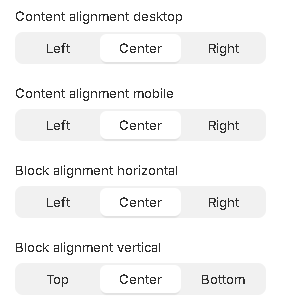
1. **`Content alignment`** - content position selector within the block. Text can have 3 positions:
* **`Left`** - content positioning on the left side;
* **`Center`** - positioning content in the center;
* **`Right`** - positioning content on the right side;
2. **`Content alignment mobile`** - content position selector within the block on the mobile. Text can have 3 positions:
* **`Left`** - content positioning on the left side;
* **`Center`** - positioning content in the center;
* **`Right`** - positioning content on the right side;
3. **`Block alignment horizontal`** - block horizontal position selector. A block can have 3 positions.
* **`Left`** - block’s positioning on the left side of the container;
* **`Center`** - block’s positioning in the center of the container;
* **`Right`** - block’s positioning on the right side of the container.
4. **`Block alignment vertical`** - block vertical position selector. A block can have 3 positions.
* **`Top`** - block’s positioning on the top side of the container;
* **`Center`** - block’s positioning in the center of the container;
* **`Bottom`** - block’s positioning on the bottom side of the container.
### Block Side-by-Side
### General
1. **`Desktop banner min height`** - set a minimum height for the banner on the desktop;
2. **`Mobile banner min height`** - set a minimum height for the banner on the mobile;
3. **`Media type`** - selector for choosing the type of media content to be displayed. Available types are:
* **`Image`** - a normal image will be displayed;
* **`HTML5 video`** - **HTML5** video will be displayed;
* **`Youtube/Vimeo`** - a video from the **YouTube** or **Vimeo** platform will be displayed;
1. **`Media content position`** - image position selector. There are two options:
* **`First`** - the image will be placed before the text block;
* **`Last`** - the image will be placed after the text block;
2. **`Label`** - field for **Label**;
3. **`Heading`** - field for **Heading**;
4. **`Text`** - field for **Text**;
5. **`Button label`** - a field for the label content of the button;
6. **`Button link`** - the **URL** field for the button;
7. **`Button aria-label`** - field for **aria-label**, this field is needed to improve **accessibility**, people using **screen readers** will hear the purpose of this button;
8. **`Image desktop`** - picker picture displayed on **Desktop**;
9. **`Image mobile`** - picker picture displayed on **Mobile**.
10. **`Image border width`** - the setting allows you to set the size of the border on the image;
11. **`Image border indent`** - the setting allows you to set the indent of the border on the image;
### Video
1. **`HTML5 Desktop Video Url`** - a field to add an **HTML5** Video to be displayed on the **Desktop**;
2. **`HTML5 Mobile Video Url`** - a field to add an **HTML5** Video to be displayed on the **Mobile**;
3. **`Youtube/Vimeo Desktop Video Url`** - a field for adding a link to **YouTube** or **Vimeo** video to be displayed on the **Desktop**;
4. **`Youtube/Vimeo Mobile Video Url`** - field to add a link to **Youtube** or **Vimeo** video to be displayed on the **Mobile**.
### Alignment
1. **`Content alignment`** - content position selector within the block. Text can have 3 positions:
* **`Left`** - content positioning on the left side;
* **`Center`** - positioning content in the center;
* **`Right`** - positioning content on the right side;
2. **`Content alignment mobile`** - content position selector within the block on mobile. Text can have 3 positions:
* **`Left`** - content positioning on the left side;
* **`Center`** - positioning content in the center;
* **`Right`** - positioning content on the right side;
### **Block** Sale Timer
### General
1. **`Desktop banner min height`** - set a minimum height for the banner on the desktop;
2. **`Mobile banner min height`** - set a minimum height for the banner on the mobile;
3. **`Media type`** - selector for choosing the type of media content to be displayed. Available types are:
* **`Image`** - a normal image will be displayed;
* **`HTML5 video`** - **HTML5** video will be displayed;
* **`Youtube/Vimeo`** - a video from the **YouTube** or **Vimeo** platform will be displayed;
4. **`Label`** - field for **Label**;
5. **`Heading`** - field for **Heading**;
6. **`Text`** - field for **Text**;
7. **`Button label`** - a field for the text content of the button;
8. **`Button link`** - the **URL** field for the button;
9. **`Button aria-label`** - field for **aria-label**, this field is needed to improve **accessibility**, people using **screen readers** will hear the purpose of this button;
10. **`Image desktop`** - choose a picture to be displayed on the **Desktop**;
11. **`Image mobile`** - choose a picture to be displayed on the **Mobile**;
12. **`Image border width`** - the setting allows you to set the size of the border;
13. **`Image border indent`** - the setting allows you to set the indent of the border;
### Timer
1. **`Year`** - years of the end of the countdown timer;
2. **`Month`** - month of the end of the countdown timer;
3. **`Day`** - day of the end of the countdown timer;
4. **`Hour`** - hour of the end of the countdown timer;
5. **`Timezone`** - Timezone;
6. **`Timer cell background color`** - setting the background color for the time cell;
7. **`Timer cell color`** - setting the text color for the cells of the countdown.
### Video
1. **`HTML5 Desktop Video`** - a field to add an **HTML5** Video to be displayed on the **Desktop**;
2. **`HTML5 Mobile Video`** - a field to add an **HTML5** Video to be displayed on the **Mobile**;
3. **`Youtube/Vimeo Desktop Video Url`** - a field for adding a link to **YouTube** or **Vimeo** video to be displayed on the **Desktop**;
4. **`Youtube/Vimeo Mobile Video Url`** - field to add a link to **YouTube** or **Vimeo** video to be displayed on the **Mobile**.
### Alignment
1. **`Content alignment`** - content position selector within the block. Text can have 3 positions:
* **`Left`** - content positioning on the left side;
* **`Center`** - positioning content in the center;
* **`Right`** - positioning content on the right side;
2. **`Content alignment mobile`** - content position selector within the block on mobile. Text can have 3 positions:
* **`Left`** - content positioning on the left side;
* **`Center`** - positioning content in the center;
* **`Right`** - positioning content on the right side;
3. **`Block alignment horizontal`** - block horizontal position selector. A block can have 3 positions.
* **`Left`** - block’s positioning on the left side of the container;
* **`Center`** - block’s positioning in the center of the container;
* **`Right`** - block’s positioning on the right side of the container.
4. **`Block alignment vertical`** - block vertical position selector. A block can have 3 positions.
* **`Top`** - block’s positioning on the top side of the container;
* **`Center`** - block’s positioning in the center of the container;
* **`Bottom`** - block’s positioning on the bottom side of the container.
## **Trick (Unique Collection Banner)**
### **Create collection metafields**
1. Go to **Settings** → **Custom Data**
2.
```
```
3.
```
```
4. Go to ‘**Collections**’
5.
```
```
6. You can add a new custom field with ‘**Add definition**’
7.
```
```
8. Add these custom fields if you need them to be unique for each collection
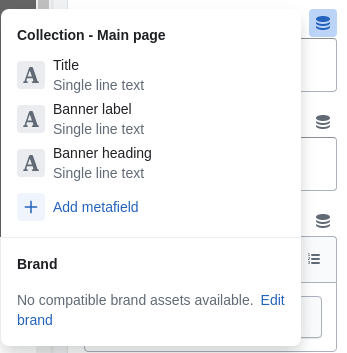
* Banner heading (type: **`Single line text`**, suggested key: **`banner.heading`**);
*
```
```
* Banner label (type: **`Single line text`**, suggested key: **`banner.label`**);
*
```
```
* Banner text (type: **`Rich text`**, suggested key: **`banner.text`**);
*
```
```
* Banner background image desktop (type: **`File`**, suggested key: **`banner.background_image_desktop`**);
*
```
```
* Banner background image mobile (type: **`File`**, suggested key: **`banner.background_image_mobile`**).
*
```
```
### **Fill collection metafields**
1. Go to **products** → **collections**
2.
```
```
3. Select **Collection**
4.
```
```
5. Fill **metafields**
6.
```
```
### **Use metafields in the customizer**
1. Go to **Customize** → **Collection** → **Default collection**
2.
```
```
3. Add the ‘**General Banner**’ section
4.
```
```
5. Click on ‘**Insert dynamic source**’ near the field you want to be unique for each collection
6.
```
```
7. Select the correct **metafield** for each field
8.
```
```
```
```
**Note:** You can make unique content by creating metafields and using it as custom data to customize whatever you want. You are not limited to the fields shown in the manual
## **Additional Information**
1. When choosing a media type, you must fill in the appropriate setting, for example, if you have selected the **Image** type, then below you will find the setting to upload images;
2. In cases where there are settings for different devices (**Desktop and Mobile**), you can fill in only one of the fields. The filled-out field will replace the empty one. For example, you can only fill in **Desktop**, which will be displayed in the same way for **Mobile** and vice versa;
3. If you set an incorrect date for the timer, the timer will not start and zero values will be displayed;
4. When the timer expires, zero values will be shown.