# Article template
## **Adding a Section**

The section is static on an **article page** template, it was added initially and cannot be removed.
## Section settings
### General
1. **`Show author`** - the setting is responsible for whether the author of the article will be displayed;
2. **`Show comments count`** - the setting is responsible for whether the number of comments will be displayed;
3. **`Latest articles heading`** - the setting is responsible for a title for a section **Latest articles** in a sidebar.
### Banner
1. **`Image`** - the setting allows you to set a picture for the banner;
2. **`Heading`** - the setting allows you to specify a heading for the banner;
3. **`Link`** - the setting allows you to specify a link for the banner.
### Layout
1. **`Desktop offset top`** - the **top** indent of the section on the **desktop**;
2. **`Desktop offset bottom`** - the **bottom** indent of the section on the **desktop**;
3. **`Mobile offset top`** - the **top** indent of the section on the **mobile**;
4. **`Mobile offset bottom`** - the **bottom** indent of the section on the **mobile**.
## Theme content
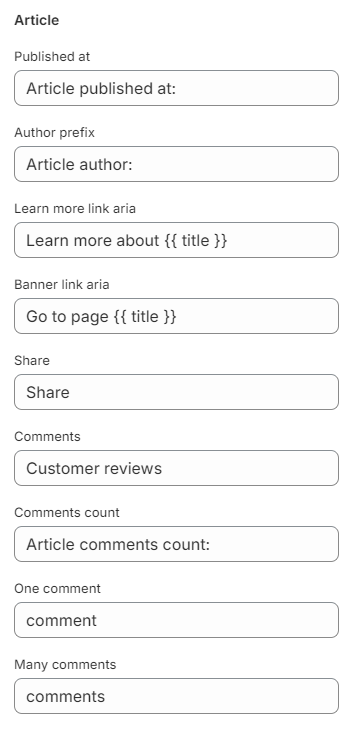
You can customize the text content in the Article section of Blogs
1. **`Published at`** - the setting allows you to set a label published at;
2. **`Author prefix`** - the setting allows you to set the author prefix ;
3. **`Learn more link aria`** - the setting allows you to set an aria label for the learn more link in the article;
4. **`Banner link aria`** - the setting allows you to set an aria label for the learn more link in the small banner;
5. **`Share`** - the setting allows you to set a label for share;
6. **`Comments`** - the setting allows you to set a label for comments;
7. **`Comments count`** - the setting allows you to set a label for comments count;
8. **`One comment`** - the setting allows you to set a label for one comment count;
9. **`Many comments`** - the setting allows you to set a label for many comment count.
You can customize the text content in the Social section of General
1. **`Share button`** - the setting allows you to set a label for share button;
2. **`Share success`** - the setting allows you to set a label for share success.
You can customize the text content in the Social alt text section of General
1. **`Share on facebook`** - the setting allows you to set a label for share on Facebook;
2. **`Share on twitter`** - the setting allows you to set a label for share on Twitter (X);
3. **`Share on pinterest`** - the setting allows you to set a label for share on Pinterest.
You can customize the text content in the Form section of Contact
1. **`Error heading`** - the setting allows you to set an error title;
You can customize the text content in the Comments section of Blogs
1. **`Title`** - setting allows you to specify a title for a comment form;
2. **`Name`** - the setting allows you to set a label for an author's name;
3. **`Name placeholder`** - the setting allows you to set a placehorder for an author's name;
4. **`Email`** - the setting allows you to set a label for an author's email;
5. **`Email placeholder`** - the setting allows you to set a placeholder for an author's email;
6. **`Message`** - the setting allows you to set a label for an author's message;
7. **`Message placeholder`** - the setting allows you to set a placeholder for an author's message;
8. **`Post`** - the setting allows you to set a placeholder for a submit button;
9. **`Moderated`** - setting allows you to set a message for Moderated status;
10. **`Success moderated`** - setting allows you to set a message for Success moderated status;
11. **`Success`** - setting allows you to set a message for Success status;
## **Additional Information**
1. **Comment form** - displayed if the blog has comments enabled in its settings;
2. **Comments** - displayed if the blog has comments enabled in its settings **Blog posts** → **Manage blogs** → ***choose blog*** → **Comments** radio button;
3. When navigating through pagination, when loading the anchor link, we will link back to the comments;
4. The **Banner** is not displayed if the settings for the `Image` field are not specified;
5. The **Latest articles** section displays the last 4 posts from the current blog (except for the current post);
6. The **Latest articles** section will not be displayed if the blog contains;
7. If the **Banner** and **Latest articles** sections are not displayed, the article content will be stretched to the width of the entire container.
8. To output the image of the author you need to create a metafield for the article type file with namespace "custom" and key "author\_image”