# Product promo
## **For Customers**
This settings block is intended for general **Product promo** settings on the site.
In order to get to the **Product promo** settings block, you need to go to **`Customizer`** → **`Theme Settings`** → **`Product promo`**.
## Settings
### General
1. **`Enable`** - the setting is responsible for enabling the popup;
2. **`Layout`** - the setting is responsible for choosing the layout. There are two settings to choose from: ***Text, Product;***
3. **`Cookie time`** - the setting is responsible for the time until the popup is re-displayed when the user closes it;
4. **`Show shadow`** - setting allows you to enable/disable shadow below the popup.
### Text
1. **`Heading`** - the setting allows you to set title text;
2. **`Icon`** - the setting allows you to set icon;
3. **`Text`** - the setting allows you to set text;
4. **`Button label`** - the setting allows you to set button label.
### Product
1. **`Product`** - the setting allows you to set the product to open quick view on click;
2. **`Product additional description`** - the setting allows you to set product description quick view which opens on click.
### Colors
1. **`Background`** - the setting allows you to set the background color;
2. **`Text`** - the setting allows you to set text color;
3. **`Button close` -** the setting is responsible for the close button color;
4. **`Button background`** - the setting allows you to set button background color;
5. **`Button label`** - the setting allows you to set button label color;
6. **`Button border`** - the setting allows you to set button border color;
7. **`Button background (hover)`** - the setting allows you to set button background color on hover;
8. **`Button label (hover)`** - the setting allows you to set button label color on hover;
9. **`Button border (hover)`** - the setting allows you to set button border color on hover.
## **Additional information**
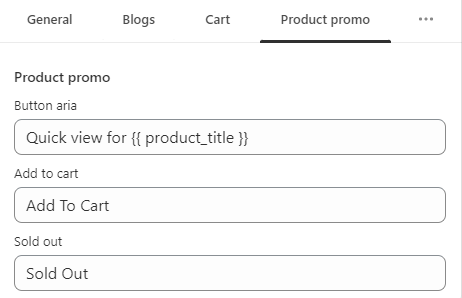
The remaining settings (texts) are taken from the translations. Product promo:
1. **`Button aria`** - the message for button aria label;
2. **`Add to cart`** - the message for add to cart button;
3. **`Sold out`** - the message for sold out button.
.png?alt=media&token=80443587-ca78-4136-a3c1-38229a0cec94)
.png?alt=media&token=4b57e91d-a641-4fa6-bc62-1dbce96a2021)
.png?alt=media&token=7b3b88c7-8430-492e-826a-bd89eff32d5c)
.png?alt=media&token=6662be41-dbfa-4f97-aa55-f9e1434667d2)
.png?alt=media&token=6d7ad7bb-1922-427a-b456-d016500af31e)
.png?alt=media&token=8a20df96-f7c7-4bbf-bbc7-d99ce6a1d1b8)
.png?alt=media&token=f810885e-291e-45ef-9ba1-2ba7c619bb96)
.png?alt=media&token=39a73d43-1dfe-43e3-8a1e-83b64933fe6e)