# Compare products

<figure><img src="https://3988388892-files.gitbook.io/~/files/v0/b/gitbook-x-prod.appspot.com/o/spaces%2FX39aWWRJk2Y01xGBqnJw%2Fuploads%2F9GObP1Rw7GldidA3Sf9W%2Fcompare-products%20(1).png?alt=media&#x26;token=87330c5a-4ee6-49b3-9a13-8a2a929717f4" alt=""><figcaption></figcaption></figure>

<figure><img src="https://3988388892-files.gitbook.io/~/files/v0/b/gitbook-x-prod.appspot.com/o/spaces%2FX39aWWRJk2Y01xGBqnJw%2Fuploads%2FX2NwMeW1ebBNzagr5Ccz%2Fcompare-products-1.png?alt=media&#x26;token=d8e8eaf8-f06b-44da-a111-b1baa0ce34a9" alt=""><figcaption></figcaption></figure>

This block of settings is intended for the **Compare products** settings on the site.

In order to get to the **Compare Products** settings block, you need to go to **`Customizer`** → **`Theme Settings`** → **`Compare products`**.

<figure><img src="https://3988388892-files.gitbook.io/~/files/v0/b/gitbook-x-prod.appspot.com/o/spaces%2FX39aWWRJk2Y01xGBqnJw%2Fuploads%2FiYFOWiE1JtowqON8uVIP%2Fcompare.png?alt=media&#x26;token=df22193c-11fb-4d93-b502-6665183a67a4" alt=""><figcaption></figcaption></figure>

## **Settings**

<figure><img src="https://3988388892-files.gitbook.io/~/files/v0/b/gitbook-x-prod.appspot.com/o/spaces%2FX39aWWRJk2Y01xGBqnJw%2Fuploads%2FU2iH76YD365e2F04pzO2%2Fcompare-products-settings.png?alt=media&#x26;token=616a0aef-e245-4373-bef6-fbcb47882875" alt=""><figcaption></figcaption></figure>

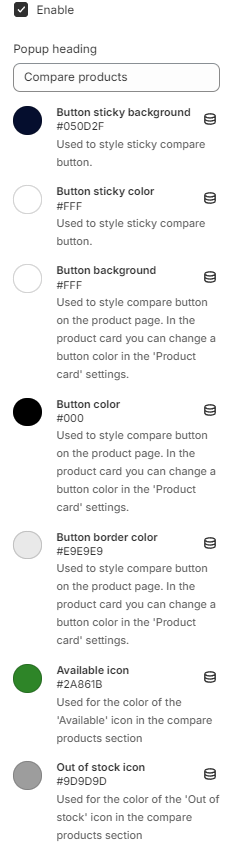
1. **`Enable`** - the setting allows you to display or not display product compare buttons;
2. **`Popup heading`** - heading of compare buttons popup;
3. **`Button sticky background`** - background color of sticky compare product button;
4. **`Button sticky color`** - text color of sticky compare product button;
5. **`Button background`** - background color of product page compare button;
6. **`Button color`** - text color of product page compare button;
7. **`Button border color`** - border color of product page compare button;
8. **`Available icon`** - color for icon “available”. Background color of the icon is set to 20% transparency;
9. **`Out of stock icon`** - color for icon “out of stock”. Background color of the icon is set to 20% transparency.

## Compare products feature

The compare products feature allows users to compare up to 6 products.

If the user attempts to add more than 6 products, an error notification will be displayed.

<figure><img src="https://3988388892-files.gitbook.io/~/files/v0/b/gitbook-x-prod.appspot.com/o/spaces%2FX39aWWRJk2Y01xGBqnJw%2Fuploads%2FzdnvoO1nlxQ2vb5nNrcO%2Fcompare-products-error.png?alt=media&#x26;token=b3c34882-9274-4531-8b0d-33f53d2f6451" alt=""><figcaption></figcaption></figure>