# Age check popup

<figure><img src="https://3988388892-files.gitbook.io/~/files/v0/b/gitbook-x-prod.appspot.com/o/spaces%2FX39aWWRJk2Y01xGBqnJw%2Fuploads%2FaqXMaaO8H16Zvj0YkpXc%2Fage-check-popup-desktop.png?alt=media&#x26;token=8ecc5123-d950-46c7-a7d0-14cfa68d1618" alt=""><figcaption></figcaption></figure>

<figure><img src="https://3988388892-files.gitbook.io/~/files/v0/b/gitbook-x-prod.appspot.com/o/spaces%2FX39aWWRJk2Y01xGBqnJw%2Fuploads%2Fb9MsD8S9m2cr5vdChVs0%2Fage-check-popup-desktop-2.png?alt=media&#x26;token=208f4f4f-d9cf-4813-a417-6196fa1c85e8" alt=""><figcaption></figcaption></figure>

<figure><img src="https://3988388892-files.gitbook.io/~/files/v0/b/gitbook-x-prod.appspot.com/o/spaces%2FX39aWWRJk2Y01xGBqnJw%2Fuploads%2FpJRaBiLP8461OjI6BB3s%2Fage-check-popup-mobile.png?alt=media&#x26;token=56b8a239-8409-46df-8d30-f15854c48bdc" alt=""><figcaption></figcaption></figure>

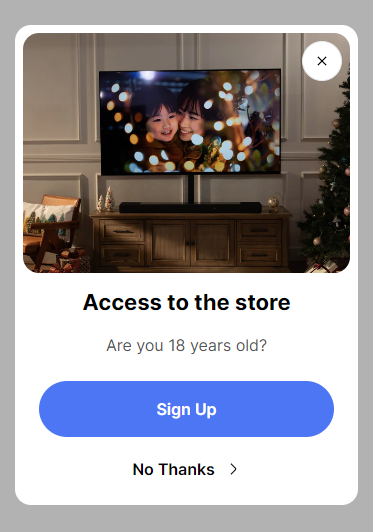
This block of settings is intended for general settings of the **Age check popup** on the site.

If the customer closes the popup - the redirect will work.

If the customer clicks on the main button - the popup will close and the customer can use a site.

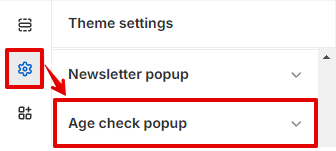
In order to get to the **Age check popup** settings block, you need to go to **`Customizer`** → **`Theme Settings`** → **`Age check popup`**.

<figure><img src="https://3988388892-files.gitbook.io/~/files/v0/b/gitbook-x-prod.appspot.com/o/spaces%2FX39aWWRJk2Y01xGBqnJw%2Fuploads%2FwUAjdmfs7w1B1ovNoY0s%2Fage-check-popup.png?alt=media&#x26;token=c29dd437-f194-4c2b-b194-9069e1c1f2f7" alt=""><figcaption></figcaption></figure>

## **Settings**

<figure><img src="https://3988388892-files.gitbook.io/~/files/v0/b/gitbook-x-prod.appspot.com/o/spaces%2FX39aWWRJk2Y01xGBqnJw%2Fuploads%2FBqZZjueG318vc3rt2cSH%2FUntitled%20(8).png?alt=media&#x26;token=95c251b1-7f3b-4ff4-96d9-69bb41438340" alt=""><figcaption></figcaption></figure>

1. **`Enable`** - the setting is responsible for enabling/disabling the popup;
2. **`Cookie time`** - the setting is responsible for the period for which the popup will be hidden when it is closed. Has several values: *1 day, 1 week, 1 month, 3 months, 1 year*;
3. **`Heading`** - popup title text field;
4. **`Text`** - text field for text content;
5. **`Button label`** - label for the main button;
6. **`Button close label`** - label for the **close** button;
7. **`Redirect link`** - link for redirect if the customer closes the popup. The “[www.google.com”](http://www.google.com”) link is used by default;
8. **`Image desktop`** - image picker for **Desktop**;
9. **`Image mobile`** - image picker for **Mobile (Desktop - default)**;
10. **`Hide image on mobile`** - the setting is responsible for showing/hiding the image on mobile.