> For the complete documentation index, see [llms.txt](https://utd-bv.gitbook.io/manual-shopify-theme-ultra/llms.txt). Markdown versions of documentation pages are available by appending `.md` to page URLs; this page is available as [Markdown](https://utd-bv.gitbook.io/manual-shopify-theme-ultra/theme-settings/general/article-card.md).
# Article card
This block of settings is intended for general settings of the **Article card** on the site.
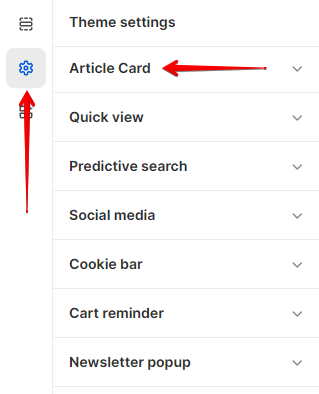
In order to get to the **Article card** settings block, you need to go to **`Customizer`** → **`Theme Settings`** → **`Article card`**.
## **Settings**
1. **`Default article image`** - the setting is used to add a default image if the article does not have one;
2. **`Read more label`** - link text for the read more link in the article card;
3. **`Show blog post date`** - the setting is responsible for showing/hiding the publication dates of the article;
4. **`Show blog post author`** - the setting is responsible for showing/hiding the author of the article;
5. **`Show blog post tag`** - the setting is responsible for showing/hiding article tags;
6. **`Strip title to 2 line`** - the setting is responsible for trimming the title of the article to 3 lines;
7. **`Strip content to 2 line`** - the setting is responsible for trimming the content of the article to 3 lines;
8. **`Show comments count`** - the setting is responsible for showing/hiding the number of comments.
9. **`Label backgorund`** - setting allows you to set the background color of the label background;
10. **`Label color`** - setting allows you to set the color for the label text;
.png)